


Best Door Lock With Camera vs Samsung Smart Door Lock: Which Is Right for Your Home?
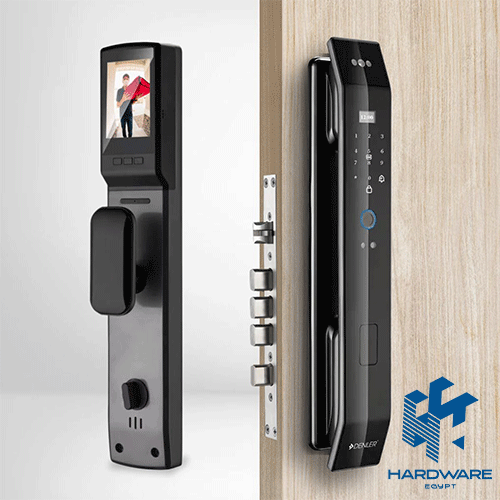
Your front door is probably something you use without thinking about it. You lock it when you leave, unlock it when you come back, and rarely give the mechanism itself much attention.
That changes when you start looking at smart locks.
Suddenly, you’re comparing fingerprints, PIN codes, cameras, mobile apps, face recognition, night vision, emergency keys, and different installation requirements. And if you’re searching for the best door lock with camera, there is another question to answer: do you actually need all of those features, or are you simply paying for technology that you won’t use?
A camera-equipped smart lock can be genuinely useful. You can see who is standing outside before opening the door, manage access without handing out physical keys, and in some models communicate with visitors directly.
But not every smart lock is built for the same type of home.
Someone living in an apartment may want a simple fingerprint lock with a camera. A villa owner may care more about night vision and wider monitoring. A family may need several access methods, while an office might need to manage access for many employees.
And if you’re specifically searching for samsung smart door lock egypt, it’s worth remembering that Samsung has different types of digital locks, so the exact model matters more than the brand name.
Before choosing a model, take a look at the available smart door locks and think about the features that would actually make your daily routine easier.
What Is a Smart Door Lock With a Camera?
A smart door lock with a camera combines two things that were traditionally separate:
access control and visitor monitoring.
The access-control side determines how someone can unlock the door. Depending on the model, that could be through:
- Fingerprint recognition.
- PIN code.
- Access card.
- Smartphone.
- Face recognition.
- Mechanical key.
The camera handles the other side of the experience. It gives you a view of the entrance and, depending on the model, may also allow two-way communication.
That means the lock can become more than a replacement for your keys.
For example, imagine you’re working from home, and someone rings the door. Instead of stopping what you’re doing and opening the door to find out who it is, you can check the visitor first.
Or you’re away, and a delivery arrives.
The usefulness of the camera becomes obvious.
But the camera should not be the only thing you evaluate.
Is a Camera Really Necessary?
Not necessarily.
If your only goal is to stop carrying keys, a basic fingerprint or PIN smart lock may already solve the problem.
A camera becomes more useful when you regularly deal with visitors, deliveries, service workers, or multiple people entering the property.
You might want a camera if you:
- Receive frequent deliveries.
- Have children coming home before you.
- Have domestic workers or maintenance staff.
- Own a villa with a less visible entrance.
- Want to check visitors at night.
- Travel frequently.
- Want to communicate with someone outside.
On the other hand, if you already have a good security camera or video doorbell covering your entrance, paying extra for another camera inside the lock may not be necessary.
This is one of those purchases where more features do not automatically mean more value.
Why a Camera Can Be Useful at the Front Door
Think about how often you interact with your entrance.
You may have someone arriving while you’re:
- Cooking.
- Working.
- Taking a call.
- Sleeping.
- Away from home.
A camera gives you information before you decide whether to open the door.
Some models also include two-way audio, which means you can speak with the person outside.
That can be particularly useful for deliveries.
Instead of opening the door simply to tell someone where to leave a package, you can communicate first.
It is a small feature, but these are often the features people end up using most.
What Should You Look for in the Best Door Lock With Camera?
The right model is not necessarily the one with the longest specification sheet.
Focus on the features that affect everyday use.
Camera Quality
Check:
- Resolution.
- Viewing angle.
- Night vision.
- Motion detection.
- Live viewing.
- Recording options.
Night performance deserves particular attention.
A front door does not stop being a security point after sunset.
If the camera image becomes unclear in low light, part of the reason you bought the lock disappears.
Two-Way Audio
If you want to communicate with visitors, check whether the lock supports two-way audio.
This can be useful for:
- Deliveries.
- Guests.
- Maintenance workers.
- Family members.
Also check how the communication works.
Some systems use a mobile app, while others may include an indoor screen or another dedicated interface.
Fingerprint Access Still Matters
It’s easy to focus on the camera and forget the actual lock.
But if the lock is slow to recognize your fingerprint every morning, the impressive camera will not make much difference.
Fingerprint access should be:
- Fast.
- Consistent.
- Easy to register.
- Suitable for multiple users.
For a family home, this is particularly convenient.
Each person can have their own fingerprint rather than sharing one password.
Hardware Egypt also lists models with several access methods alongside biometric entry. For example, the I12 Face Version supports fingerprint, password, card, face recognition, and a mechanical key.
That kind of flexibility can be more useful than relying on one access method alone.
Face Recognition: Useful or Just Another Feature?
Face recognition is becoming more common in advanced smart locks.
The appeal is obvious.
You approach the door, and if the system recognizes you, the lock can provide access without requiring a key or fingerprint.
It can be convenient, but ask yourself whether you need it.
If fingerprint access already works well for your family, face recognition may be an extra rather than a necessity.
It becomes more interesting when you want:
- Touch-free access.
- Multiple authentication methods.
- Faster entry.
- A more advanced smart-home setup.
Hardware Egypt’s smart door lock I12 Face Version is an example of a model combining face recognition with fingerprint, password, card, and mechanical-key access.
The important part is not having every available technology.
It’s having enough reliable options that you won’t be stuck when one method isn’t convenient.
Samsung Smart Door Lock Egypt: What Should You Compare?
When searching for Samsung Smart Door Lock Egypt, it is easy to assume that every Samsung digital lock offers the same features.
They don’t.
Samsung’s digital lock range includes different access methods and designs, including fingerprint, PIN, RFID, Bluetooth, and smartphone-enabled options on compatible models.
That means you should start with the exact model.
For example, you might want:
- Fingerprint access.
- PIN entry.
- RFID cards.
- Smartphone control.
- Automatic locking.
- Emergency access.
Another buyer may specifically need a built-in camera.
Those are not necessarily the same requirement.
So when comparing a Samsung smart door lock, check the complete specification rather than choosing based on the Samsung name alone.
Samsung Smart Door Lock Egypt: Is Samsung Always the Right Choice?
Brand reputation can certainly be part of the decision.
But your door and your usage should come first.
A Samsung model may be an excellent choice for someone who prioritizes digital access and a particular smart-home setup.
Another camera-equipped lock may be more suitable for someone whose main priority is:
- Live video.
- Night vision.
- Two-way audio.
- Temporary passwords.
- Multiple access methods.
The important question is not:
“Which brand is more famous?”
It’s:
“Which model gives me the features I actually need?”
That approach can save you from paying more for features that won’t improve your day-to-day experience.
Smart Door Lock With Camera vs Regular Smart Lock
Here’s the simplest way to look at it.
| Regular Smart Lock | Camera Smart Lock | |
| Fingerprint | Usually available | Usually available |
| PIN | Available | Available |
| Card | Depending on model | Depending on model |
| Smartphone | Depending on model | Often available |
| Visitor video | No | Yes |
| Two-way audio | Usually no | Available on selected models |
| Night vision | No | Available on selected models |
| Price | Usually lower | Usually higher |
If you simply want keyless entry, the regular smart lock may be enough.
If you want to see and communicate with visitors, the camera becomes much more valuable.
Which Smart Lock Is Suitable for an Apartment?
Apartment owners often do not need the most complicated system.
A practical setup might include:
- Fingerprint access.
- PIN.
- Mechanical backup.
- Camera.
- Good battery life.
The main thing to check is compatibility with the apartment door.
You should know:
- Door thickness.
- Door material.
- Existing lock mechanism.
- Required installation space.
A compact lock can also be preferable when space around the door is limited.
The lock should make entering your apartment easier without creating a complicated installation problem.
What About a Villa?
A villa entrance can have different requirements.
The entrance may be:
- Larger.
- Less visible from inside.
- Exposed to more outdoor conditions.
- Used by more people.
This is where camera performance becomes more important.
Consider:
Night Vision
Can you identify someone after dark?
Viewing Angle
Does the camera cover the area you actually want to see?
Multiple Users
Can family members have separate access?
Temporary Access
Can you provide access to workers or visitors without giving them a permanent key?
Construction
Does the lock offer the level of physical durability appropriate for the entrance?
For a villa, buying a lock based on appearance alone is particularly risky.
Smart Door Locks for Offices
A smart lock can also be useful outside the home.
An office may need access for:
- Employees.
- Managers.
- Visitors.
- Maintenance staff.
In this situation, the number of users matters.
You may also want:
- Temporary passwords.
- User management.
- Access records.
- Different access methods.
A simple family-oriented lock may not be the best fit for a busy workplace.
Think about how many people will use it today and whether that number is likely to increase.
Temporary Access Is One of the Most Useful Smart Features
Here’s a situation that happens often.
You are away from home.
A technician needs to enter.
With a traditional key, you have to arrange for someone to meet them or give them a physical key.
With a compatible smart lock, temporary access can be much easier.
Some models support temporary passwords or app-based access.
Hardware Egypt’s Smart Door Lock i7 Cat Eye, for example, includes temporary passcodes alongside fingerprint, PIN, card, mechanical-key, and app-based access.
This type of feature can be particularly useful for:
- Rental properties.
- Cleaning services.
- Maintenance.
- Short-term visitors.
It also means you do not have to create a permanent access method for someone who only needs to enter once or twice.
Installation Can Make or Break the Purchase
Smart-lock technology is only useful if the lock fits the door correctly.
Before ordering, check:
- Door thickness.
- Door material.
- Existing lock body.
- Lock dimensions.
- Door opening direction.
- Handle position.
- Installation requirements.
For example, Hardware Egypt lists the Lzen New I7 Cat Eye Smart Door Lock as suitable for wooden and steel doors, with left- and right-handed configurations.
Another model may have completely different requirements.
Don’t assume that because one smart lock fits your door, another one will too.
If you’re replacing an existing lock, measuring first can save you a lot of trouble.
Battery Life and Emergency Access
This is not the most exciting part of the specification sheet.
It may be the most important when something goes wrong.
A smart lock depends on its battery for electronic functions, so you need to know what happens when the battery gets low.
Look for:
- Low-battery warnings.
- Emergency charging.
- Mechanical key backup.
- Replaceable or rechargeable batteries.
Hardware Egypt’s Smart Door Lock K30 Face Version includes lithium battery power and emergency power input, while several other models include mechanical keys as a backup.
You should always understand the emergency-entry method before buying.
Don’t wait until the battery is dead to find out how it works.
Camera Smart Lock vs Separate Doorbell Camera
You may already have another option:
a regular smart lock plus a separate camera.
That setup can actually make sense for some homes.
A separate camera gives you more flexibility in terms of:
- Position.
- Viewing area.
- Camera height.
- Coverage.
A camera built into the lock has another advantage:
Everything is in one place.
You don’t need a separate device just to monitor the entrance.
For a small apartment, an integrated lock may be cleaner and simpler.
For a large property, a separate security-camera system may provide wider coverage.
Think about the area you actually need to monitor before deciding.
Privacy Is Worth Considering
Smart locks can collect more information than traditional locks.
Depending on the model, this could include:
- Access records.
- User information.
- Video.
- Images.
- App activity.
If the lock connects to the internet or a cloud service, check what the system requires and how its connected features work.
You should also:
- Use strong passwords.
- Avoid sharing access unnecessarily.
- Keep the app updated.
- Remove old users when they no longer need access.
Smart security is still security technology.
It deserves the same attention you would give any connected device in your home.
How Much Should You Spend on a Smart Door Lock?
There is no single price that makes a lock “good.”
The cost usually changes according to the combination of features.
A simpler smart lock may focus on:
- Fingerprint.
- PIN.
- Card.
- Key.
More advanced models may add:
- Camera.
- Face recognition.
- Night vision.
- Wi-Fi.
- App control.
- Two-way audio.
- Temporary passwords.
Hardware Egypt currently has camera-equipped models at different price points. For example, the Smart Door Lock I13 Face Version is listed with face recognition, fingerprint, password, card, mechanical key, Wi-Fi, live video, two-way audio, color night vision, and an indoor screen.
The useful takeaway is not that you should buy the most expensive model.
It is that you should compare what you are actually getting for the price.
How to Choose the Right Lock for Your Situation
Still undecided?
Start with the problem you are trying to solve.
“I don’t want to carry keys.”
Look for:
Fingerprint + PIN + backup key
“I want to see who is outside.”
Look for:
Camera + live video + night vision
“I want to speak to visitors.”
Look for:
Camera + two-way audio
“Several family members need access.”
Look for:
Multiple fingerprints + PIN/card options
“I need to give temporary access.”
Look for:
Temporary passwords + app management
“I want a lock for an office.”
Look for:
Multiple users + access management + suitable installation
This approach is much easier than comparing twenty specifications without knowing which ones matter.
Common Mistakes When Buying a Smart Door Lock
Buying Based on the Camera Alone
A good camera does not compensate for a poor locking mechanism.
Assuming Every Samsung Lock Has a Camera
The samsung smart door lock egypt market includes different digital-lock models, so check the exact specifications.
Ignoring Door Compatibility
This can turn a promising purchase into an installation problem.
Choosing the Most Expensive Model
You may pay for features you never use.
Forgetting Emergency Entry
Always have a backup method.
Ignoring Night Performance
The camera should work when you actually need it.
Skipping Professional Installation
Incorrect alignment can affect the lock’s operation.
Forgetting to Remove Old Users
If someone no longer needs access, remove their fingerprint, card, or code.
Smart Door Lock Buying Checklist
Before placing an order, check:
- Door thickness
- Door material
- Existing lock mechanism
- Camera quality
- Night vision
- Fingerprint access
- PIN access
- Card access
- Face recognition if required
- App functionality
- Temporary passwords
- Two-way audio
- Battery life
- Low-battery warning
- Emergency power
- Mechanical key backup
- User capacity
- Warranty
- Installation requirements
Frequently Asked Questions
What is the best door lock with a camera?
The right model depends on your door and how you plan to use it. Look at camera quality, night vision, access methods, battery backup, app functions, compatibility, and installation.
Is a smart door lock with a camera worth it?
It can be worthwhile if you want to see visitors, check deliveries, or communicate with people outside while also controlling access to the door.
Is Samsung a good option for a smart door lock in Egypt?
Samsung offers different digital-lock models with features such as fingerprint, PIN, RFID, Bluetooth, and smartphone access on compatible models. The exact model should be checked carefully, especially if you specifically need a built-in camera.
Does every Samsung smart door lock have a camera?
No. Samsung offers different types of digital locks, and a camera should be confirmed in the specifications of the exact model.
Can a smart door lock be installed on any door?
No. Compatibility depends on the door’s material, thickness, existing lock mechanism, dimensions, and installation requirements.
What happens when a smart lock battery dies?
Many models include emergency power options or a mechanical key. Always check the exact backup method before buying.
Is fingerprint access better than a PIN?
Neither is universally better. Fingerprint access is convenient for regular users, while a PIN can be useful for temporary access. Having both gives you more flexibility.
Can smart locks provide temporary access?
Some connected models support temporary passwords or app-based access. This can be useful for visitors, maintenance workers, cleaners, and rental properties.
Do I still need a security camera if my smart lock has one?
Possibly. The lock camera mainly covers the entrance. A separate camera may be better if you need wider coverage around the property.
Conclusion
A smart lock should make your entrance easier to manage, not turn a simple door into a complicated piece of technology.
If your main concern is keyless access, fingerprint and PIN entry may be enough. If you want to know who is outside before opening the door, a door lock with a camera gives you another level of visibility. And if you need to manage several users, features such as temporary passwords, cards, app access, and multiple fingerprints become much more useful.
For anyone searching for Samsung Smart Door Lock Egypt, the same rule applies: compare the exact model rather than the brand name. Make sure it has the features you actually want and, just as importantly, that it fits your door.
Before buying, check the door measurements, battery backup, installation requirements, camera performance, and available access methods. A few minutes of checking can prevent an expensive installation mistake later.
You can browse the available smart door locks on Hardware Egypt and compare models according to the features that matter for your home or business.
The best smart lock is not necessarily the one with the most features.
It is the one that gives you reliable access, useful visibility, and a backup plan when technology doesn’t cooperate.
Frequently Asked Questions
What is the best door lock with camera?
The right model depends on your door and how you plan to use it. Look at camera quality, night vision, access methods, battery backup, app functions, compatibility, and installation.
Is a smart door lock with a camera worth it?
It can be worthwhile if you want to see visitors, check deliveries, or communicate with people outside while also controlling access to the door.
Is Samsung a good option for a smart door lock in Egypt?
Samsung offers different digital-lock models with features such as fingerprint, PIN, RFID, Bluetooth, and smartphone access on compatible models. The exact model should be checked carefully, especially if you specifically need a built-in camera.
Is Samsung a good option for a smart door lock in Egypt?
Samsung offers different digital-lock models with features such as fingerprint, PIN, RFID, Bluetooth, and smartphone access on compatible models. The exact model should be checked carefully, especially if you specifically need a built-in camera.