


Best Smart Front Door Locks: What to Check Before You Buy
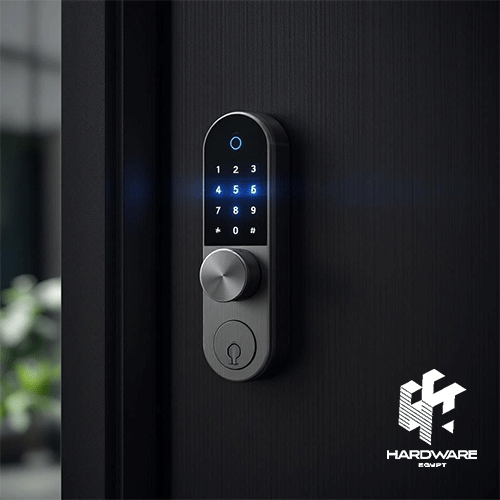
Choosing the best smart front door locks is not simply about finding the model with the longest feature list. A front door is one of the main access points to your home, so the lock needs to fit the door correctly, provide convenient access for the people who live there, and include reliable backup options if the battery, internet connection, or smart functions are unavailable.
For some homes, fingerprint access and a keypad may be enough. Others may benefit from remote control, temporary visitor passwords, app notifications, facial recognition, or a built-in camera.
The best smart door lock with camera adds another layer to the experience by combining access control with visual monitoring. Depending on the model, you may be able to see who is outside, use night vision, speak to visitors through two-way audio, or check the entrance through a mobile app.
The best home smart locks should also match how the household actually uses the door. Families may need several fingerprints and user profiles. Homes with regular visitors may benefit from temporary passcodes. A homeowner who travels frequently may prioritize remote access and notifications.
Current smart-lock testing guides place similar importance on access methods, app reliability, battery performance, installation, smart-home compatibility, guest access, and door security rather than ranking products only by the number of smart features they offer.
Best Smart Front Door Locks: Quick Decision Matrix
| Model | Main Use | Reviewed Specification | Reviewed Price |
|---|---|---|---|
| HP P19b G4 | Basic office use | 18.5″, 1366×768, TN | Approx. EGP 4,250 |
| Dell E1920H | Basic office use | 18.5″, 1366×768, TN | EGP 3,000–4,050 |
| HP M24f | Office / general use | 23.8″, FHD, IPS | Approx. EGP 8,500 |
| Samsung LC32G55TQBM | Gaming | 32″, QHD, VA, 144Hz, curved | Approx. EGP 8,500 |
| Dell P2419H | Business/office use | 23.8″, FHD, IPS | Approx. EGP 3,600 |
The right choice depends on the door first and the smart features second.
What Makes a Smart Lock Suitable for a Front Door?
Front-door smart locks have a different job from interior locks.
A bedroom, office, or cabinet lock may only need simple access control. The front entrance usually needs to deal with daily use, family members, visitors, deliveries, outdoor or semi-outdoor conditions, and emergency access.
When comparing the best smart front door locks, look at five areas first:
- Mechanical compatibility
- Access methods
- Security features
- Power and backup access
- Remote or camera functionality
A smart lock can have an excellent app and still be the wrong product if the lock body does not fit your door.
The Hardware Egypt smart-lock range includes products for different wooden and steel door configurations, and several listings specifically identify left- and right-hand compatibility.
Start With Door Compatibility
Before comparing cameras, fingerprints, or apps, check the physical door.
You need to know:
- Door material.
- Door thickness.
- Existing lock body.
- Mortise dimensions.
- Handle position.
- Door opening direction.
- Available installation space.
- Whether the entrance is exposed to weather.
Some smart locks replace a conventional lock completely. Others are designed around specific mortise dimensions or door structures.
For example, Hardware Egypt lists the I13 Cat Eye for doors between 35 and 100 mm thick, while several Lzen models are described as suitable for wooden and steel doors.
Never assume that a product advertised as a “front door smart lock” will automatically fit every front door.
Which Unlocking Methods Do You Actually Need?
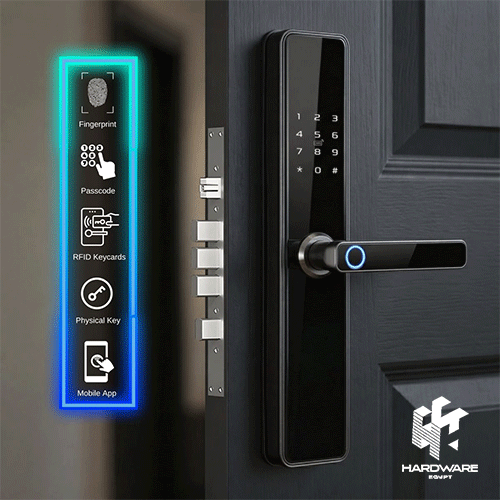
One of the biggest advantages of modern smart locks is that they can provide several ways to enter.
Common methods include:
- Fingerprint.
- PIN/password.
- RFID or MIFARE card.
- Mobile app.
- Facial recognition.
- Palm or other biometric access on some newer systems.
- Mechanical key.
- Remote unlocking.
The best combination depends on the household.
Fingerprint Access
Fingerprint entry is useful for family members because it removes the need to carry keys or remember a code.
Current smart-lock reviews frequently include fingerprint models among their recommended options because biometric entry can provide quick everyday access.
Hardware Egypt also carries many models with fingerprint access, including camera-equipped products such as the Smart Door Lock I7 Cat Eye 2514. Its listed access methods include fingerprint, passcode, mechanical key, and smartphone control.
PIN and Password Access
PIN entry is useful for family members who do not want to use biometrics and for temporary visitors.
A lock that supports temporary passwords can also help when:
- A cleaner needs access.
- Family is visiting.
- Maintenance staff needs temporary entry.
- Someone needs access while you are away.
Yale’s current smart-lock support documentation similarly allows guest entry codes and different guest-access permissions on compatible products.
Cards
Cards can be useful for children, older family members, rental environments, or users who prefer a physical credential without using a traditional key.
Mechanical Key
Smart should not mean “no backup.”
A physical emergency key can be valuable if the battery fails or another electronic access method becomes unavailable.
Several camera locks currently listed by Hardware Egypt include mechanical-key backup alongside electronic methods.
Best Smart Door Lock With Camera: What Should the Camera Do?
A camera changes the role of the lock.
Instead of only controlling access, the device can also provide information about who is outside.
When comparing the best smart door lock with camera, check whether it provides:
- Live video.
- Night vision.
- Wide viewing angle.
- Motion alerts.
- Visitor capture.
- Two-way audio.
- Video doorbell function.
- Remote viewing.
- Local or cloud storage.
- Indoor display.
Current camera-lock products can combine several of these functions. Eufy’s Video Smart Lock E330, for example, integrates a 2K camera, fingerprint access, video doorbell functionality, remote app control, a keypad, and physical-key access.
That does not mean every home needs all of them.
If your entrance already has a dedicated video doorbell or security camera, a simpler smart lock may be enough.
If you want one device to manage entry and visitor monitoring, an integrated camera lock becomes more attractive.
The right choice depends on the door first and the smart features second.
What Makes a Smart Lock Suitable for a Front Door?
Front-door smart locks have a different job from interior locks.
A bedroom, office, or cabinet lock may only need simple access control. The front entrance usually needs to deal with daily use, family members, visitors, deliveries, outdoor or semi-outdoor conditions, and emergency access.
When comparing the best smart front door locks, look at five areas first:
- Mechanical compatibility
- Access methods
- Security features
- Power and backup access
- Remote or camera functionality
A smart lock can have an excellent app and still be the wrong product if the lock body does not fit your door.
The Hardware Egypt smart-lock range includes products for different wooden and steel door configurations, and several listings specifically identify left- and right-hand compatibility.
Start With Door Compatibility
Before comparing cameras, fingerprints, or apps, check the physical door.
You need to know:
- Door material.
- Door thickness.
- Existing lock body.
- Mortise dimensions.
- Handle position.
- Door opening direction.
- Available installation space.
- Whether the entrance is exposed to weather.
Some smart locks replace a conventional lock completely. Others are designed around specific mortise dimensions or door structures.
For example, Hardware Egypt lists the I13 Cat Eye for doors between 35 and 100 mm thick, while several Lzen models are described as suitable for wooden and steel doors.
Never assume that a product advertised as a “front door smart lock” will automatically fit every front door.
Which Unlocking Methods Do You Actually Need?
One of the biggest advantages of modern smart locks is that they can provide several ways to enter.
Common methods include:
- Fingerprint.
- PIN/password.
- RFID or MIFARE card.
- Mobile app.
- Facial recognition.
- Palm or other biometric access on some newer systems.
- Mechanical key.
- Remote unlocking.
The best combination depends on the household.
Fingerprint Access
Fingerprint entry is useful for family members because it removes the need to carry keys or remember a code.
Current smart-lock reviews frequently include fingerprint models among their recommended options because biometric entry can provide quick everyday access.
Hardware Egypt also carries many models with fingerprint access, including camera-equipped products such as the Smart Door Lock I7 Cat Eye 2514. Its listed access methods include fingerprint, passcode, mechanical key, and smartphone control.
PIN and Password Access
PIN entry is useful for family members who do not want to use biometrics and for temporary visitors.
A lock that supports temporary passwords can also help when:
- A cleaner needs access.
- Family is visiting.
- Maintenance staff need temporary entry.
- Someone needs access while you are away.
Yale’s current smart-lock support documentation similarly allows guest entry codes and different guest-access permissions on compatible products.
Cards
Cards can be useful for children, older family members, rental environments, or users who prefer a physical credential without using a traditional key.
Mechanical Key
Smart should not mean “no backup.”
A physical emergency key can be valuable if the battery fails or another electronic access method becomes unavailable.
Several camera locks currently listed by Hardware Egypt include mechanical-key backup alongside electronic methods.
Best Smart Door Lock With Camera: What Should the Camera Do?
A camera changes the role of the lock.
Instead of only controlling access, the device can also provide information about who is outside.
When comparing the best smart door lock with camera, check whether it provides:
- Live video.
- Night vision.
- Wide viewing angle.
- Motion alerts.
- Visitor capture.
- Two-way audio.
- Video doorbell function.
- Remote viewing.
- Local or cloud storage.
- Indoor display.
Current camera-lock products can combine several of these functions. Eufy’s Video Smart Lock E330, for example, integrates a 2K camera, fingerprint access, video doorbell functionality, remote app control, keypad and physical-key access.
That does not mean every home needs all of them.
If your entrance already has a dedicated video doorbell or security camera, a simpler smart lock may be enough.
If you want one device to manage entry and visitor monitoring, an integrated camera lock becomes more attractive.
Camera Smart Lock vs Separate Video Doorbell
This is worth deciding before purchasing.
Choose an Integrated Camera Lock When:
- You want fewer entrance devices.
- The lock position provides a useful viewing angle.
- You want access control and video in one app.
- Two-way communication is important.
- Your door can accommodate the larger hardware.
Consider Separate Devices When:
- You already have a good video doorbell.
- You want a wider or differently positioned camera.
- You prefer separate upgrade cycles.
- You need more advanced surveillance coverage.
Hardware Egypt also carries dedicated Security Cameras, so it is worth deciding whether the lock camera will replace or complement a broader home-camera system.
The existing Home Security Cameras guide provides more detail on home surveillance when monitoring extends beyond the front door.
Night Vision Matters at the Front Door
A camera is much less useful if the image becomes unclear when the entrance is dark.
If your front door is in:
- A dim corridor.
- A building entrance.
- A poorly lit villa entrance.
- A location with limited night lighting.
Check the camera’s low-light or night-vision capability.
Hardware Egypt’s Smart Door Lock i12 Face Version lists colour night vision, live video, video intercom and two-way audio alongside face, fingerprint, password, card and key access. It is currently listed at EGP 24,000.
That makes it a very different type of product from a basic keypad or fingerprint-only lock.
Face Recognition vs Fingerprint
Face recognition can be convenient because the user does not need to touch the lock.
Fingerprint access is often simpler and may be enough for many households.
The decision should depend on:
- Number of users.
- Ease of use.
- Lighting conditions.
- Camera position.
- Household preferences.
- Budget.
- Required backup methods.
Several of Hardware Egypt’s “Face Version” models combine facial recognition with fingerprint, passwords, cards and mechanical keys rather than relying on face recognition alone.
That multi-access approach is useful because no single entry method needs to be the only way into the home.
Remote Access and Mobile Apps
Remote access becomes particularly useful if you travel often or need to manage entry when you are not at home.
Depending on the product, the app may allow you to:
- Lock or unlock the door.
- View the camera.
- Receive alerts.
- Create temporary passwords.
- Review activity.
- Communicate with visitors.
- Manage users.
Hardware Egypt lists a number of locks using Tuya and Smart Life, including the I16 Face Version, K30 Face Version, and several other Lzen models.
If app control is important, do not simply check that an app exists.
Also ask:
- Does remote access require Wi-Fi?
- Does the lock connect directly or need a hub?
- Which app manages the device?
- Can several family members use it?
- Are temporary credentials supported?
- What happens if the internet goes down?
Local fingerprint, PIN or key access should continue to matter even when remote functions are available.
Guest Codes Can Be More Useful Than Remote Unlocking
Remote unlocking sounds convenient, but it also requires you to respond every time someone needs access.
Temporary codes can be more practical.
For example, you might create access for:
- A relative visiting for a weekend.
- A cleaner on specific days.
- A technician.
- A short-term house sitter.
- A trusted neighbour.
Yale’s guest-access system supports personal entry codes and configurable access for invited users on compatible products.
Several Hardware Egypt smart locks also explicitly list temporary-password functionality.
Battery Life and Emergency Power
Most residential smart locks are battery-powered.
That makes battery management part of the buying decision.
Look for:
- Low-battery alerts.
- Rechargeable or replaceable battery type.
- Emergency power input.
- Mechanical key backup.
- Expected opening cycles or manufacturer battery estimate.
The I7 Cat Eye 2514, for example, uses a rechargeable battery and includes emergency access options, while several other local models include Micro-USB or Type-C emergency power.
Do not wait until the battery is completely dead before responding to a low-battery warning.
Security Is More Than Smart Features
A smart lock is still a lock.
Its physical construction, cylinder, installation and door fit remain important.
When evaluating residential locks internationally, BHMA certification assesses hardware in areas including security, durability and finish.
Not every product in every market uses the same certification system, so do not assume a feature such as facial recognition or a camera proves the mechanical lock itself is stronger.
For the best home smart locks, evaluate both sides:
Mechanical security
- Lock body.
- Cylinder.
- Materials.
- Door compatibility.
- Proper installation.
Smart security
- User authentication.
- App permissions.
- Password management.
- Access logs.
- Tamper alerts.
- Secure backup methods.
Smart features should complement a properly fitted lock, not replace basic physical security.
What About Tamper Alerts and Access Records?
Alerts can help homeowners understand what is happening at the entrance.
Some locks can notify you about:
- Tampering.
- Manual opening.
- Low battery.
- Door activity.
- Failed entry attempts.
For example, Hardware Egypt’s K30 Face Version lists an anti-theft alarm, mobile notification when the handle is manually opened, temporary passwords and app controls.
The I13 Cat Eye also lists a tamper alarm and app-controlled access alongside fingerprint, PIN and card entry.
Activity records can be particularly useful for households with several users.
Smart-Home Compatibility
If you already use smart-home devices, consider whether the lock fits the same ecosystem.
Globally, newer smart locks increasingly support platforms and standards such as:
- Apple Home.
- Google Home.
- Amazon Alexa.
- Samsung SmartThings.
- Matter.
For example, Eufy’s current FamiLock S3 Max supports Matter integration, although Eufy notes that camera streaming itself is not carried through Matter.
This is an important distinction.
A lock may integrate its locking function with a smart home platform while video remains inside the manufacturer’s own app.
For other connected devices available locally, Hardware Egypt also has a Smart Home System category covering additional smart-home products.
Privacy and Camera Storage
A camera-equipped lock creates more data than a normal smart lock.
Before purchasing, check:
- Where video is stored.
- Whether cloud storage is optional or required.
- Whether there is local storage.
- Who can access recordings.
- Whether a subscription is necessary.
- How user credentials are stored.
For example, Eufy states that E330 video and lock-event data can be stored on its compatible MiniBase Chime while fingerprint and password security data remain local to the lock.
The exact storage model varies by manufacturer.
Do not assume every camera smart lock stores video in the same way.
Best Home Smart Locks for Families
The best home smart locks for families should make daily access easier for different people.
A family-focused setup may benefit from:
- Multiple fingerprints.
- PIN codes.
- RFID cards.
- Temporary codes.
- Child safety lock.
- Mechanical backup.
- Mobile notifications.
- Access history.
Products with several access methods are often more practical than a lock built around a single biometric feature.
For example, the Lzen New I16 Face Version Smart Door Lock supports face recognition, fingerprints, passwords, cards and a mechanical key. Hardware Egypt lists it as compatible with wooden and steel doors and currently prices it at EGP 18,000.
Smart Locks for Apartments
Apartment entrances often have different requirements from villa front doors.
Important points include:
- Door material.
- Existing mortise.
- Building rules.
- Corridor lighting.
- Whether the camera faces a shared area.
- Wi-Fi coverage at the entrance.
- Privacy considerations.
A camera may be especially useful when the apartment does not have a traditional peephole.
Hardware Egypt’s Cat Eye products combine smart locking with viewing functionality, making this category relevant to apartment entrances where door compatibility is confirmed.
Smart Locks for Villas
A villa entrance may require greater attention to environmental exposure.
Before installing a smart lock outdoors, check:
- Operating temperature.
- Humidity specification.
- Water resistance.
- Rain exposure.
- Direct sunlight.
- Installation protection.
Do not assume every electronic lock is designed for direct outdoor exposure.
A covered front entrance and a completely exposed gate are very different environments.
If broader entrance monitoring is required, a dedicated security camera may also be useful in addition to the lock camera.
Smart Lock With Camera or Smart Intercom?
These categories can overlap.
A camera smart lock focuses primarily on securing and unlocking the door.
A smart intercom focuses more heavily on visitor communication and entrance management.
If you need communication across a larger property, several doors, or a building entrance, an intercom system may be the better core solution.
Hardware Egypt’s previous guide to Intercom Systems explains how modern intercoms combine video, audio, and connected access features.
For a simple apartment front door, however, a camera-equipped smart lock may combine enough functionality in one device.
Current Smart Front Door Lock Options at Hardware Egypt
The following prices were reviewed on 19 August 2026. Product prices and availability can change, so confirm the live listing before ordering.
| Model | Main Use | Reviewed Features | Reviewed Price |
|---|---|---|---|
| Smart Door Lock I13 Cat Eye | Camera smart lock | Camera, fingerprint, PIN, RFID card, app | EGP 13,500 |
| Smart Door Lock I7 Cat Eye 2514 | Remote camera access | Camera, two-way audio, fingerprint, PIN, app | EGP 13,770 |
| Lzen I16 Face Version | Face recognition | Face, fingerprint, PIN, card, Wi-Fi | EGP 18,000 |
| Lezn K30 Face Version | Face + video security | Face, night vision, live video, fingerprint | EGP 19,500 |
| Lezn I12 Face Version | Face + video intercom | Face, camera, video intercom, night vision | EGP 24,000 |
The Smart Door Lock I13 Cat Eye is currently listed at EGP 13,500 and includes fingerprint, password, card, mechanical key, remote control, indoor camera viewing, and night vision.
The Smart Door Lock I7 Cat Eye 2514 is listed at EGP 13,770 and includes a built-in camera, two-way audio, fingerprint, passcode, key backup, app control, and temporary passcodes.
The Lzen I16 Face Version Smart Door Lock is listed at EGP 18,000 and adds facial recognition alongside fingerprint, password, card and mechanical access.
The Door Lock K30 Face Version is currently listed at EGP 19,500 and includes a night-vision camera, live video, two-way audio, fingerprint access, temporary passwords, and anti-theft alerts.
At the higher end of this reviewed selection, the Smart Door Lock i12 Face Version is listed at EGP 24,000 and combines facial recognition, live video, two-way audio, color night vision, fingerprints, passwords, cards, and mechanical backup.
Do You Need the Most Expensive Smart Lock?
Not necessarily.
A household that only needs fingerprint and PIN access may get little benefit from paying for:
- Facial recognition.
- A large internal screen.
- Video intercom.
- Advanced camera features.
Likewise, someone specifically looking for the best smart door lock with camera should not choose a cheaper fingerprint-only lock simply because both products are described as “smart.”
Start with the requirement.
Then compare price.
Common Smart Front Door Lock Buying Mistakes
Choosing Features Before Checking the Door
A smart lock that does not fit properly is the wrong lock, regardless of technology.
Assuming Every Camera Is the Same
Compare night vision, live viewing, two-way audio, and viewing angle.
Relying on One Unlocking Method
Choose a practical backup such as PIN, key or card.
Ignoring Battery Backup
Check low-battery warnings and emergency power.
Forgetting Other Family Members
The lock should work for everyone who uses the door.
Assuming Wi-Fi Is Always Required
Local fingerprint and PIN access can still be important when internet connectivity is unavailable.
Ignoring Privacy
Camera-equipped devices should have clear storage and account-management settings.
Treating a Smart Lock as a Complete Security System
A lock controls one access point. Wider home security may also involve Security & Automation products such as cameras, alarms, intercoms, and access-control equipment.
The previous Hardware Egypt guide to Camera WiFi can also help when remote visual monitoring is required beyond the door itself.
Smart Front Door Lock Buying Checklist
Before purchasing, confirm:
- Door material.
- Door thickness.
- Lock-body dimensions.
- Door direction.
- Indoor or outdoor exposure.
- Fingerprint requirement.
- PIN requirement.
- Card requirement.
- Facial recognition requirement.
- Camera requirement.
- Night vision.
- Two-way audio.
- Live video.
- Temporary passwords.
- App compatibility.
- Wi-Fi requirement.
- Smart-home compatibility.
- Number of users.
- Child safety feature.
- Tamper alarm.
- Access history.
- Battery type.
- Low-battery warning.
- Emergency charging.
- Mechanical backup.
- Installation requirements.
- Warranty.
- Current price.
- Current availability.
This checklist makes it easier to compare the best smart front door locks based on real requirements rather than marketing language.
Final Verdict: Which Smart Front Door Lock Should You Choose?
The best smart front door locks should make entering your home easier without introducing unnecessary complexity.
For many families, a lock with fingerprint, PIN, card and mechanical backup may already provide the right balance of convenience and flexibility.
If visitor monitoring matters, move toward the best smart door lock with camera for your specific entrance. Look for useful video features such as live viewing, night vision and two-way communication rather than choosing a camera simply because one is built into the lock.
The best home smart locks should also work for everyone in the household. Consider children, older family members, regular visitors, cleaners, maintenance staff and anyone else who may need access.
Most importantly, match the lock to the door before matching it to an app.
Hardware Egypt currently offers 67 products within its Smart Door Lock category, covering basic fingerprint models through camera and face-recognition systems.
You can compare current Smart Door Lock options and review individual product specifications before choosing.
If you are unsure whether a particular lock fits your door or need help finding a specific configuration, contact Hardware Egypt with your door type, dimensions and required access features.
What should I look for in the best smart front door locks?
Start with door compatibility, then compare access methods, mechanical backup, battery management, app functionality, security features and installation requirements. A lock should fit the door correctly before its smart features matter.
Are smart locks safe for front doors?
A smart lock can be appropriate for a front door when it is mechanically suitable, installed correctly and provides reliable access control. Physical lock quality remains important alongside smart functions. BHMA evaluates residential hardware for security, durability and finish.
What is the best smart door lock with camera for a home?
The right model depends on the entrance and required features. Look for live video, night vision, two-way audio, useful access methods, backup entry and clear app controls. Hardware Egypt currently lists several camera-equipped Cat Eye and Face Version locks.
What happens if a smart lock battery dies?
This depends on the model. Many locks provide low-battery warnings and backup methods such as emergency USB power or a mechanical key. Check the exact model before purchasing.
Is fingerprint or facial recognition better for a smart lock?
Neither is automatically better. Fingerprints are simple and practical for everyday family access, while facial recognition can provide touch-free entry. Models supporting several access methods give households more flexibility.